In this post, we will try to understand what causes “Too many SOQL Queries 101 error”. Salesforce is a multi-tenant environment(Multiple client orgs are run on the Same server) as a result there are some limitations enforced by Salesforce to make sure all clients utilize the platform efficiently. As part of this process, Salesforce imposes Governor limits on its clients to make sure all the orgs adhere to salesforce guidelines.
Too many SOQL Queries 101 error is a governor limit imposed by Salesforce and this issue appears when we write our query inside for Loop. The maximum number of queries allowed in a Single transaction is 100 queries. The number 100 looks to be a huge number but we could hit this number very easily in a Single transaction if we do not write our code efficiently.
Inefficient Code: The below code cause “Too many SOQL Queries 101 error” when we load more than 100 records in a single transaction. Note: By default, triggers process 200 records at a time.
for(Contact con: trigger.new)
{
List<Account> AccountList =[Select id,Name from Account where id=:con.AccountId];
}
Efficient Code: Remove the Query inside the for loop and write it outside the loop.
List<String> AccidList =new List<String>();
for(Contact con: trigger.new)
{
AccidList.add(con.accountId);
}
List<Account> AccountList =[Select id,Name from Account where id=:AccidList];
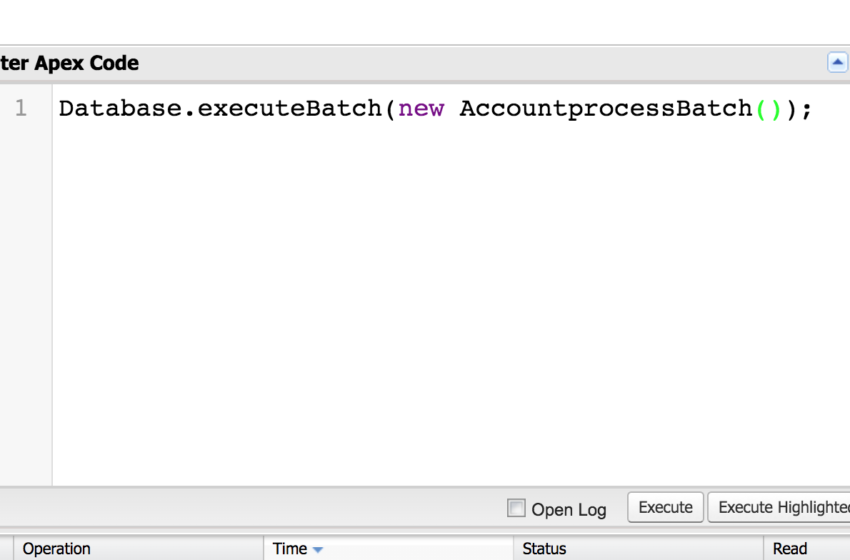
In this post, we will try to understand how to execute a Batch job from Dev Console. We could use the below command in the Execute Anonymous tab of Dev Console.
You could use any of the below Commands
Database.executebatch(new BatchjobName);
Database.executebatch(new BatchjobName,Size);
Example: We have a batch job AccountProcessBatch that needs to be executed with a default size.
Database.executebatch(new AccountprocessBatch());
Note: Default size for Batch job is 200.
Example: If we want our batch job (AccountProcessBatch) to be executed with the desired size such as 500 then we will use the below command.
In this post, We will try to understand what is recursion and how to solve recursion in Salesforce. Recursion is caused when the same code is executed multiple times which results in an Infinite loop execution. This, in turn, causes the Governor limits to be hit and the code/execution will result in an error.
Scenario: We want to update an Email field on Lead Object through the trigger(After update event) and if there is already an existing process builder/workflow with Same Email Field update then this results in Recursion.
How to Avoid Recursion: In order to avoid recursion, we need to Create a Static Variable with a Boolean flag and check the value in the trigger code.
public class recursionUtility{
public static boolean isInitialrun =true;
}
In Lead trigger, we will try to use the utility code and skip the execution after the first run.
trigger LeadTrigger on Lead (after update){
List<String>emailIdList =new List<String>();
//Verify if the trigger already ran once
if(recursionUtility.isInitialrun){
//After the run set the isInitialrun flag to false as we do not want it to be executed multiple times.
Lightning data service helps you to perform CRUD(Create/Read/Update/Delete) operations on a record without Apex code. It will honor Field level security and sharing rules for us without any additional processing.
12.How to create components using Lightning Data Service?
We could use lightning:recordForm(Display/Create/Edit record) or lightning:recordEditForm (Create or edit Records with lightning:inputField) or lightning:recordViewForm(Display records with lightning:outputField) to create components. If we need additional customization then we can use force:recordData
13. What is the major limitation with Lightning Data Service?
We could use Lightning Data Service for only Single Record. It does not support multiple records.
14. What is Component Event propagation?
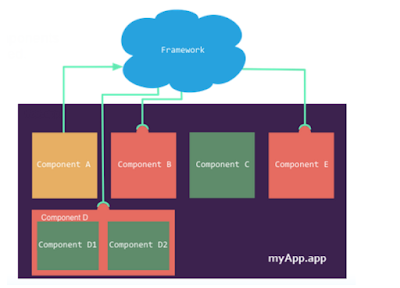
Component uses capture and Bubble phases for event propagation. These phases are similar to DOM handling patterns and interested components can interact with the event.
Capture Phase: The event is captured and trickles down from the application root to the source component. The event can be handled by a component in the containment hierarchy that receives the captured event. Event handlers are invoked in order from the application root down to the source component that fired the event. Any registered handler in this phase can stop the event from propagating, at which point no more handlers are called in this phase or the bubble phase.
Bubble Phase: The component that fired the event can handle it. The event then bubbles up from the source component to the application root. The event can be handled by a component in the containment hierarchy that receives the bubbled event. Event handlers are invoked in order from the source component that fired the event up to the application root. Any registered handler in this phase can stop the event from propagating, at which point no more handlers are called in this phase.
15.What is the sequence of Event propagation?
Event Fired –A component event is fired.
Capture Phase–The framework executes the captured phase from the application root to Source component until all components are traversed. Any handling event can stop the event propagation by calling stopPropagation() on the event.
Bubble phase — The framework executes the bubble phase from the Source component to the application root until all components are traversed or stopPropagation() is called.
16. How to create custom component Event in aura framework?
Use tag in .evt resource to create a custom component Event. Events can contain attributes that can be set before the event is fired and read when the event is handled.
17. How to handle component events in aura framework?
A component event can be handled by the component that fired the event(Source component) or by a component in the component hierarchy/Parent components.
Use <aura:event> tag in the markup of handler component
The name attribute in must match the name attribute in the tag in the component that fires the event.
Note: Component Event handlers are associated with bubble phase by default. We can use Phase attribute to change the handler to Capture phase.
18. What are Application events in aura framework?
Application events follow traditional publish-subscribe model. Application event is fired from an instance of the component and all components that provide a handler for the event are notified.
In this article, We will try cover Salesforce Lightning Interview Questions in detail
1. What is Lightning?
Lightning is a component framework that was built on Aura framework. We can build reusable blocks that could be used in Lightning experience, communities, and mobile. Salesforce mobile app was created on Aura framework and released in Dreamforce 2013.
2. What are different types of Lightning Events?
Lightning uses event-driven programming.In Aura framework events are fired from Javascript Controller Actions. Events can contain attributes that can be set before the event is fired and read when the event is handled.
We have three different types of Lightning Events.
Component Event
Application Event
Standard Event
3. Define Lightning Bundle?
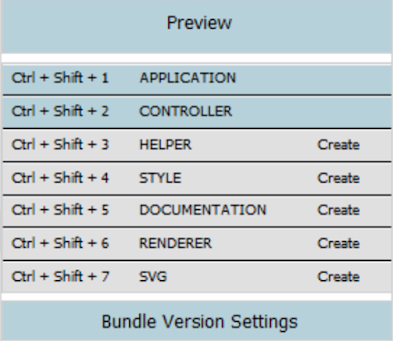
Lightning bundle contains different elements such as
Application
Controller(JavaScript)
Helper(Reusable JavaScript within the component)
Style
Documentation
Renderer
Svg
4. What is Lightning Out functionality?
Lightning out functionality is used to display lightning components in the Salesforce classic on Visualforce Page. We can also display Lightning apps on the External site using Lightning out functionality.
5. What is Lightning Locker Service?
Lightning Locker Service helps in eliminating Cross-site Scripting attacks. If there are multiple components in the Lightning app then each component will not be able to access each other JS Component and also will not be able to access Real Dom/Window. Salesforce authored components run in System/admin mode and has access to everything. Custom components can access other components DOM as long as they are in the same namespace but won’t be able to access other DOM if they are in the different namespace when Lightning locker service is enabled.
6. Can we communicate with Visualforce or Lightning Aura/Web components?
Yes, Salesforce introduced Lightning Message Service Api(beta as of Spring 2020) to communicate among Salesforce User Interfaces(DOM, Aura Components, Visualforce Pages and Lightning Web Components). A Lightning Web component uses a Lightning Message Channel to access the Lightning Message Service API. Reference Lightning Message Channel with the scoped module @salesforce/messageChannel. In Visualforce, use the global variable $MessageChannel. In Aura, use lightning:messageChannel in your component.
7. Prior Lightning Message API how did the communication happen between Visualforce and Lightning Aura/Web components in Lightning Experience?
Earlier we have to implement a custom Publish-Subscribe(Pub-sub) solution to communicate between Visualforce and Lightning Aura/Web components in Lightning Experience.
8. What is Component Event in Lightning?
A component event could be handled by Parent components or the components above the Hierarchy. A component event could also be consumed by the source component that fired the event.
9. Does Lightning Component run Synchronously or asynchronously?
Salesforce Lightning components are executed asynchronously.
10. Can we Integrate Third party JavaScript frameworks with Lightning?
Yes we can integrate 3rd party applications like Angular JS, Node JS and other Java script frameworks with Lightning.
In this post, We will try to populate Map with List of Values. Whether we write a trigger, Apex class, or Batch Apex we encounter this Scenario.
Scenario 1: We want to populate a Map with Account Id as the key and List of Contacts as Values. We will be iterating against the contact object and populating this map.
Note: We are populating a Map with List of Subject.
Map> AccountIdToContacts = new Map>();
for(Contact newCont : [SELECT AccountId FROM Contact LIMIT 50000]) { if(AccountIdToContacts.containsKey(newCont.AccountId)) { List conts = AccountIdToContacts.get(newCont.AccountId); conts.add(newCont); AccountIdToContacts.put(newCont.AccountId, conts); } else { AccountIdToContacts.put(newCont.AccountId, new List { newCont }); } }
Scenario 2: We want to populate a Map with Account Id as the key and List of Opportunities as Values. We will be iterating against the Opportunity object and populating this map. Note: We are populating a Map with List of String.
Map> AccountIdToOppIds = new Map>(); for(Opportunity newOpp : [SELECT AccountId FROM Opportunity LIMIT 50000]) { if(AccountIdToOppIds.containsKey(newOpp.AccountId)) { List oppIds = AccountIdToOppIds.get(newOpp.AccountId); oppIds.add(newOpp); AccountIdToOppIds.put(newOpp.AccountId, oppIds); } else { AccountIdToOppIds.put(newOpp.AccountId, new List { newOpp.Id }); } }