Author

Sai Rakesh Puli

Browsing

In this article, we will try to understand what is a Data extension, various ways to access Data extensions. One of the biggest challenges in learning a new language/Application is understanding the Technical terminology. After reading through this article we should be able to correlate Data extensions to other familiar programming languages.

Data Extension is a placeholder with different field/attributes which can hold data. When compared to other programming languages like oracle you can call it as Table which can hold data. Fields in Data extensions can be compared to Columns in Tables. If you are familiar with Salesforce then you can compare this with Salesforce Custom object with Fields which can hold data. If you are from a non-programming background then think this as a Table in your excel or CSV.

Let us understand how we can access data extensions in Marketing Cloud using Email Studio and Audience Builder.

Option 1: Once you login to the Marketing cloud then click on Email Studio and select Email from the Dropdown. After Selecting Emails then navigate to Subscribers dropdown and click on Data Extensions.

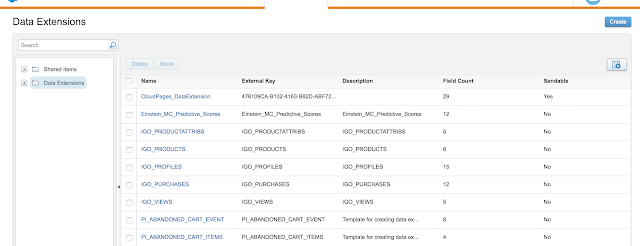
Based on your role in the Marketing cloud you will have the ability to view available Data Extensions or create Data Extensions by using create a button on the top right corner. You can see the screenshot below for visualization purposes.

Option 2: We can also access Data Extensions from Audience Builder and by selecting Contact Builder from the dropdown. After Selecting Contact Builder there would be various Tabs displayed on the page and Navigate to Data extensions to select desired Data Extensions.
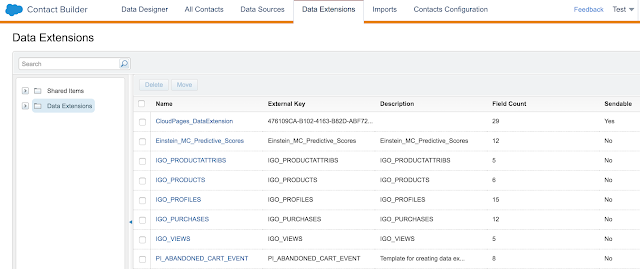
 In order to create a new Data Extension from Contact Builder, Select the Data Extensions tab and click on Create on the Top right Corner. You can see the screenshot below for visualization purposes.
Summary: We have successfully learned various ways to access Data extensions in the Marketing Cloud.

In the next article, we will try to cover different types of Data extensions and how to create a Data extension in the Marketing Cloud.

In this post, We will try to understand the key difference between With Sharing and without Sharing in Salesforce.

With Sharing Keyword: Apex by default runs in System mode or Admin mode. In Admin mode the class will have all the access to the field and object irrespective of running user’s permission. Any class that has With Sharing will enforce the Sharing rules for the current user. This has to be explicitly specified while writing the class as by default the class will have without sharing.

For Example: If a user with a Standard profile has access to Name or Address field on Account object then he/she will be able to only insert/update only Name and Address field. He/she will not be able to insert/update other fields as they do not have access to other fields as per profile access.

public with sharing class AccountsharingClass {

}

Without Sharing Keyword: Apex by default runs in without Sharing mode(ie admin mode/System mode).In Admin mode the class will have all the access to the field and object irrespective of running user’s permission. We could also explicitly specify without sharing keyword to ensure sharing rules are not imposed for the current user.

public without sharing class AccountsharingClass {

}

Note: If a method is defined in a class declared with with sharing is called

by a class declared with without sharing, the method executes with sharing 

rules are enforced. Ex: Lets assume we have two classes,Class A is created with

 “with sharing” and Class B iscreated with “without sharing”. If We call class A

from Class B then with sharing rules will be applied.

In this post, We will try to understand how to initiate Batchjob from Other Batch Job. Every Batch job consists of three methods such as Start, Execute, and Finish methods.

In the start method, we will query for the list of records from the desired object. Generally, We use Querylocator as it could hold up to 50 million records.

Execute method – All the business logic is processed inside the Execute method by using the list of records from the Start method

Finish method – This is the last method inside batch apex which will be executed after the Execute method. We could send an Email or Call a Batch job or do both inside this method.

Ex: We have two Batchjobs such as AccountBatch and ContactBatch.We could call ContactBatch from the finish method of AccountBatch

global class AccountBatch implements Database.Batchable<sObject>

{

    global Database.QueryLocator start(Database.BatchableContext BC)

    {

        String query = ‘SELECT Id,Name FROM Account’;

               return Database.getQueryLocator(query);

    }

    global void execute(Database.BatchableContext BC, List<Account> scope)

    {

       List<Account> accList = new List<Account>();

     for(Account acc : scope)

        {

            acc.Name = “Account Processed”;

            accList.add(acc);

        }

        update accList;

    }

    global void finish(Database.BatchableContext BC)

{

// Call Contactbatch job from AccountBatch

    ContactBatchJob contactJob = new ContactBatchJob();

   database.executebatch(contactJob);

    }

}

Organizations have started to make their Digital investments over the internet in order to reach their customers using various channels such as Email, Social, Web and SnailMail/Physical Mail. Some of the Marketing Automation tools include Marketing Cloud, Pardot, MailChimp, SilverPop, Marketo, etc. In this article, we will try to go over some of the Terminology/jargon used in the Marketing Cloud. We will also discuss differences between pardot and Marketing Cloud with use-cases at the end of the article.

Salesforce purchased Exact target on June 4th 2013 and renamed it as the Marketing cloud subsequently.

Let us go over some of the common terminology used in Marketing Cloud

1. Data Extension

2. Journey Builder

3. Email Studio

4. Cloud Pages

5. Email Templates

6. Amp Script

7. Contact Builder

8. Segmentation

9. FTP process

10. Marketing Connect

Pardot vs Marketing Cloud:

Through pardot we can only market to our customers who have email. This type of marketing is Single channel marketing and pardot does not support multi-channel marketing. This works great for organizations that had a larger customer base with email addresses. Pardot can also connect to Salesforce CRM to sync with contacts and Leads. Pardot also can track visitors by using cookies and help in providing insights into visitor behavioral tracking.

The marketing cloud provides multichannel marketing such as Email/Social/Web/Mobile/Direct mail/etc. This is best suited for organizations that want to reach their customers through various channels in order to interact with their customers. For example in the eCommerce industry, We can send Email to customers and if they do not respond to email then we can post Ads through social studio and if they do not respond to social media ads then we can send a text over mobile and if there is no response from the customer then as the last option we can send the promotional message through Snail Mail/Direct mail.

In this post, We will try to understand how to schedule a batch job in Salesforce to run every 30 mins. Salesforce User interface gives us the ability to only Schedule Apex classes on an hourly basis. If we want to schedule our batch class to run every 30 mins or to run at 12:30/1:30/2:30/3:30  this is not possible from user interface.

We could achieve the desired functionality from developer console. Run the below command to schedule the job to run for every 30 mins

Command for 30 mins:

system.schedule(‘AccSched30min’, ‘0 30 * * * ?’, new AccountSchedule());

Command for 15 mins:

system.schedule(‘AccSched15min’, ‘0 15 * * * ?’, new AccountSchedule());

Command for 45 mins:

system.schedule(‘AccSched45min’, ‘0 45 * * * ?’, new AccountSchedule());

Command for 10 mins:

system.schedule(‘AccSched10min’, ‘0 10 * * * ?’, new AccountSchedule());

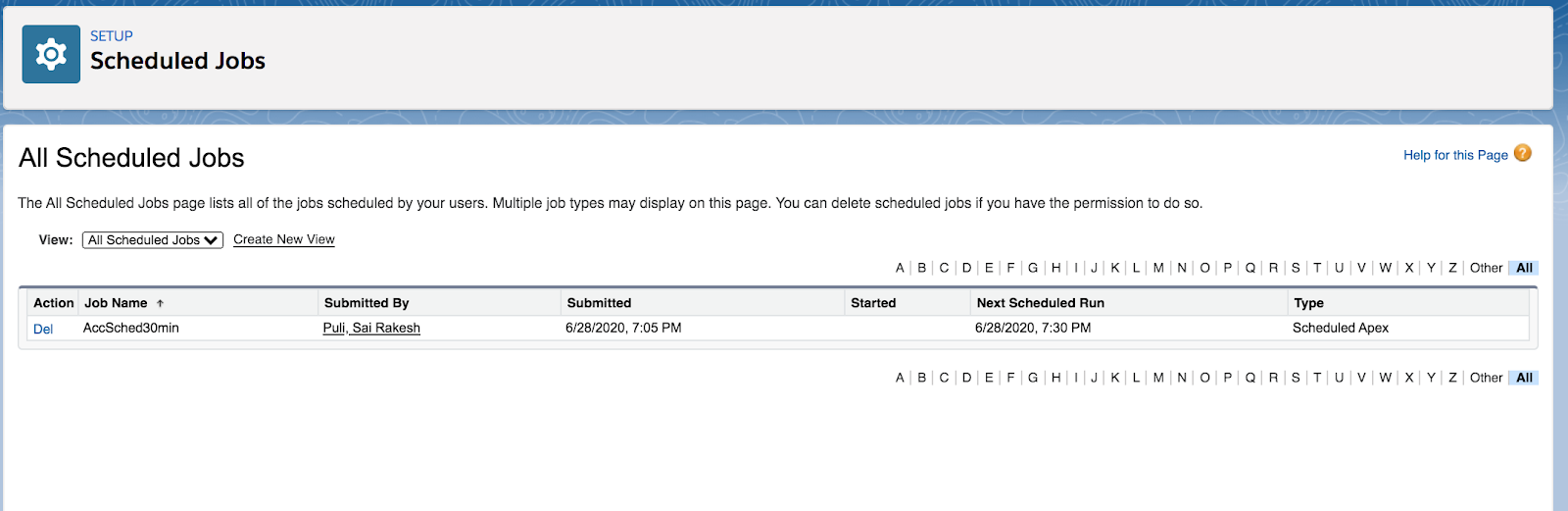
From Schedule Jobs check for the jobs that were scheduled.

In this article, we will cover the All Subscriber List which is the most important aspect of the Marketing Cloud. A customer or prospect appears in the All subscriber list when they were sent an email for the first time. This contains a master list of all customers/prospects. All subscriber list will contain the subscriber/customer record based on a unique subscriber key when an email was sent for the first time. If you have contactid as the Subscriber key in your org then All subscriber list will contain the record with the Subscriber key that sent the email to the customer/subscriber. If you sent multiple emails for same emailid with different subscriber keys then you will see multiple records in the All subscriber list as your subscriber key is different.

Navigation:

Email Studio –> Email –> Subscribers –> All Subscribers

Frequently Asked Questions:

1. We have sent 3 emails(same email id) with the Same Subscriber key. Will we see 3 records in the All Subscriber List?

Ans. No, you will see only one record which was sent for the first time

2. We have sent 5 emails with different subscriber key for the first time. Will we see 5 records in the Subscriber List?

Ans. Yes if you are sending the emails to your customer/prospect(Subscriber) for the very first time

3. What will happen to All subscribe List when a customer Unsubscribes his/her email?

Ans. When a customer unsubscribes his/her email then the record is marked as Unsubscribed in the All Subscriber List.  Customer/Subscriber is unsubscribed from all Lists and groups.

4. What will happen if the customer/subscriber resubscribes?

Ans.  Customer/Subscriber is readded to the All Subscriber List.

5. We have Multi org with Business Units enabled in the Marketing cloud. Do we have multiple All Subscribers list?

Ans. No, you will have only one All Subscribers list across all Business Units.

6. We have multi org with Business units enabled in the Marketing cloud. What will happen when a customer/subscriber unsubscribes?

Ans.  It depends on the property settings enabled in the Business unit. We have the below options to choose while setting up Business Units.

  • Subscribers will be unsubscribed from all business units in the Enterprise
  • Subscribers will be unsubscribed from this business unit only
https://help.salesforce.com/articleView?id=mc_es_unsubscribe_settings.htm&type=5

7. We have contactid as our subscriber key and our org has duplicate records with a same email address. What will happen to All subscriber list when an email is sent to that customer/subscriber?

Ans. As said earlier All subscriber list will contain the subscriber/customer based on a unique subscriber key when an email was sent for the first time. In this scenario, contactid is the Subscriber id and All subscriber list will contain the record with the Subscriber key that sent the email to customer/subscriber. If you sent multiple emails with different subscriber keys then you will see multiple records in the All subscriber list as your subscriber key is different.

Ex: We have 5 Marc Buffet(markb@salesforce.com) records with different contactids(Remember ContactId is subscriber key) then All subscriber list will contain multiple Mark Buffet records with same email if you sent emails with different contact ids. If you sent one or multiple emails for Mark Buffet with same contact id then you will see only 1 record in the All Subscriber list.

8. We have Email address as Subscriber key and we have duplicate records with the same email address but different First name/last name. What will happen to the All Subscriber list when an email is sent to that customer/subscriber?

Ans. All subscriber list will contain a row/record with the email address for the subscriber when an email is sent. Since the subscriber key is based of Email address, you will see only one row in the All subscriber list eventhough you sent multiple emails

Ex: You have two records with same email address with different first name and last name.

9. We have contactid as our subscriber key and our org has duplicate records with the same email address. What will happen to All subscriber list when a customer/subscriber is unsubscribed?

Ans. When a customer unsubscribes, All subscriber list will be marked with unsubscribed for the contactid(subscriber key) that the customer/subscriber clicked on. Marketing cloud will allow you to send email over duplicate email address as the contactid(subscriber key) is different. Its always important to go back and mark all the records with same email address to be marked as unsubscribed or remove duplicates so that customers/subscribers will not receive emails.

10. We have Email address as Subscriber key and we have duplicate records with the same email address. What will happen to All subscriber list when a customer/subscriber is unsubscribed?

Ans. Once a customer/subscriber clicks on unsubscribe then he will no longer receive emails from the Marketing cloud in future as subscriber key is based of email address.

51. If i have two triggers(Accttrigger and accounttrigger) on the Same object(Account) with
Same event(after insert), can i know which trigger will fire first?

No we cannot determine which trigger can be fired first. In order to control the execution, write a trigger per object and call an Apex class where we can control the Execution.

52. Can we Call a Future method from trigger?

Yes we can call a future method from trigger. This feature is helpful to call a Webservice /Callout process.

53. Can we invoke a Schedule Job from Trigger?

We can invoke a Schedule job from Trigger.

54. Can we invoke a Batch Apex class from Trigger?

We can invoke a Batch Class from Trigger

trigger acctTrigger on Account(before insert,before update){

AccountBatch accBatch = new AccountBatch();

Database.executeBatch(accBatch);

}

55. Can we Skip triggers for desired users or profiles in Salesforce?

We can skip triggers using Hierarchical Custom settings in salesforce for Desired profile.

56. When should we use before trigger vs after trigger?

As a groundrule, always use before triggers when you donot want to act on the Id of the record.Since before triggers doesnot require any DML it also helps in reducing DML and increasing performance compared to After Triggers. Use After triggers if we want to perform operations after the record is inserted(example Id is generated) and we want to perform operations on the child entities based on the record inserted. Ex: If we want to insert a contact record after an account is inserted then we need to write an After insert trigger on Account object and based on the account id we will insert the contact and associate Account id to it.

57.  Can we send Emails using Triggers?

Yes, We can send Emails using Triggers.The maximum number of Emails that could be sent is 5000 per org depending on Edition(Enterprise/Unlimited).

58. What are best practices in triggers?

a.Always write one trigger per object with all events.

b.For controlled execution write a trigger and call a Class and define methods in desired order.

c.Always write trigger to process a minimum of 200 records in single transaction

d. Avoid SOQL queries inside for loop as it will result in Governor Limits.

e. Avoid DML statements inside for Loop as it will result in Governor Limits.

59. Will the Triggers be fired if there is an workflow/process builder that performs an action?

Before update and After update triggers will be refired when a field update occurs from processbuilder/workflow.

https://developer.salesforce.com/docs/atlas.en-us.apexcode.meta/apexcode/apex_triggers_order_of_execution.htm

41. What is Recursion and when does this issue occur?

Recursion is the process of executing the same piece of code infinite times. Eventually, this will result in hitting Governor limits in Salesforce. This issue occurs when we have an after Update Trigger event along the Process builder/Workflow field update acting on the Same field.

Example: If we have an After update trigger on Opportunity that is trying to Update a stage field and we also have a process builder/workflow on Stage field this will result in Recursion as the trigger update will fire the Process builder/workflow and process builder/workflow is again going to invoke trigger. This will keep on executing infinite times and eventually, the process results in hitting governor Limit.

hitting governor Limit.

42. How to avoid Recursion in Salesforce?

We can avoid recursion in Salesforce by using a static helper method. Read below for complete details of Recursion

43.  What is DML in salesforce?

DML(Data Manipulation Language) in Salesforce provides the ability to manage records using insert, Update, Delete and Restore statements

44. What are different DML Statements in Salesforce?

insert,update,upsert,delete,undelete,merge

45. What is the difference between update and upsert?

update statement helps in updating the record based on recordId. Upsert DML statement creates the record if there is no existing record and if a record exists then it will update the record.

46. Will any records be deleted during merge process?

The merge statement merges up to three records of the same sObject type into one of the records, deleting the others, and re-parenting any related records.

47. What are different Database methods in Salesforce?

  • Database.insert()
  • Database.update()
  • Database.upsert()
  • Database.delete()
  • Database.undelete()
  • Database.merge()

48. What is difference between DML Statements and Database methods?

Unlike DML statements, Database methods have an optional allOrNone parameter that allows you to specify whether the operation should partially succeed. When this parameter is set to false, if errors occur on a partial set of records, the successful records will be committed and errors will be returned for the failed records.

Note: No exceptions are thrown with the partial success option.

49. Can i insert partial records in a Transaction?

Yes we can insert partial records in a transaction using Database method with allorNone parameter set to false.

Ex:  Database.SaveResult[] results = Database.insert(recordList, false);

50. Please provide a sample code that process partial records in salesforce?

Execute the below piece of code in Execute Anonymous window of Developer Console

// Create a list of contacts

List<Contact> conList = new List<Contact> {

        new Contact(FirstName=’Joe’,LastName=’Smith’,Department=’Finance’),

        new Contact(FirstName=’Kathy’,LastName=’Smith’,Department=’Technology’),

        new Contact(FirstName=’Caroline’,LastName=’Roth’,Department=’Finance’),

        new Contact()};

// Bulk insert all contacts with one DML call

Database.SaveResult[] srList = Database.insert(conList, false);

// Iterate through each returned result

for (Database.SaveResult sr : srList) {

    if (sr.isSuccess()) {

        // Operation was successful, so get the ID of the record that was processed

        System.debug(‘Successfully inserted contact. Contact ID: ‘ + sr.getId());

    } else {

        // Operation failed, so get all errors

        for(Database.Error err : sr.getErrors()) {

            System.debug(‘The following error has occurred.’);

            System.debug(err.getStatusCode() + ‘: ‘ + err.getMessage());

            System.debug(‘Contact fields that affected this error: ‘ + err.getFields());

}

    }

}

31.  What is the difference between trigger.old and trigger.new?

Trigger.old contains lists of old records(old field values) and Trigger.new contains list of new records(new field values). Ex: If we have written a trigger on Account, trigger.new contains list of new Account records and trigger.old contains list of old Account records.

32. What is the difference between trigger.oldmap and trigger.newmap?

Trigger.oldmap contains map of oldSobjectrecords with key as Id’s and Trigger.newmap contains map of  Id’s of sobjectrecords.

Note: Trigger.oldmap is only available in update and delete Triggers. Trigger.newmap is only available in before update, after insert, after update, and after undelete triggers.

33. What are the different types of events in the trigger?

A trigger can be invoked with 7 events

Before insert, Before Update, After insert, After update, Before delete,After delete,After undelete

34. Explain best practices in Trigger?

We should write one trigger per object by defining all events. We should call a class from trigger to handle processing logic so that we can control the execution. Optionally we could also write event-based triggers per object but maintaining this would be difficult. Since we have 7 events we can have 7 triggers per object.

35. What is the default size of records that a trigger can process?

By default, the processing size of trigger is 200. But there are exceptions to this rule. For example: If we are loading records through data loader and you have changed the record size to 500 then the trigger will fire for 500 records at a time.

36. What are the operations that don’t invoke triggers?

https://developer.salesforce.com/docs/atlas.en-us.apexcode.meta/apexcode/apex_triggers_ignoring_operations.htm

37. What is bulkification?

https://developer.salesforce.com/docs/atlas.en-us.apexcode.meta/apexcode/apex_triggers_bulk_idioms.htm

38. Can I perform DML Operations on trigger.new and trigger.old context variable?

No, you cannot perform DML Operations on trigger.new and trigger.old context Variable.

39. Explain Sample trigger code with different trigger events?

trigger myAccountTrigger on Account(before delete, before insert, before update, 

                                    after delete, after insert, after update) {

if (Trigger.isBefore) {

    if (Trigger.isDelete) {

        // In a before delete trigger, the trigger accesses the records that will be

        // deleted with the Trigger.old list.

        for (Account a : Trigger.old) {

            if (a.name != ‘okToDelete’) {

                a.addError(‘You can\’t delete this record!’);

            } 

        }

    } else {

    // In before insert or before update triggers, the trigger accesses the new records

    // with the Trigger.new list.

        for (Account a : Trigger.new) {

            if (a.name == ‘bad’) {

                a.name.addError(‘Bad name’);

            }

    }

    if (Trigger.isInsert) {

        for (Account a : Trigger.new) {

            System.assertEquals(‘xxx’, a.accountNumber); 

            System.assertEquals(‘industry’, a.industry); 

            System.assertEquals(100, a.numberofemployees);

            System.assertEquals(100.0, a.annualrevenue);

            a.accountNumber = ‘yyy’;

        }

// If the trigger is not a before trigger, it must be an after trigger.

} else {

    if (Trigger.isInsert) {

        List<Contact> contacts = new List<Contact>();

        for (Account a : Trigger.new) {        

            if(a.Name == ‘makeContact’) {

                contacts.add(new Contact (LastName = a.Name,

                                          AccountId = a.Id));

            }

        } 

      insert contacts;

    }

  }

}}}

  1. How can we call multiple methods in desired order in Lightning Component?

We can achieve these requirements in two ways.

  1. Using Callback for each method
  2. Using Javascript Promises
  3. What type of Interface is required in Lightning component to enable as Tab?

In order to add Lightning Component as a Tab, My domain needs to be enabled in the org.We have to use force:appHostable interface to a Lightning Component to allow it to be used as Custom tab

  1. What type of interface is required in Lightning component to be used as Quickaction?

We can use force:lightningQuickAction interface to a Lightning Component to allow it to be used as a Custom action in Lightning Experience or mobile app. These components can be used object-specific or global actions in both Lightning Experience/Mobile app

  1. How are Lightning Components migrated between the environments?

Lightning components can be deployed using Changesets,Eclipse Ide,Metadata API and ANT Migration Tool.

  1. What is the purpose of aura:method in Salesforce Lightning?

The main purpose of  aura:method is to define a method as part of a component’s API. This enables you to directly to call a method in a component’s client-side controller instead of firing and handling a component event. Using aura:method simplifies the code needed for a parent component to call a method on a child component that it contains.

26.How to access Apex methods in Lightning Component?

We have to use @AuraEnabled  method in the Apex class to be accessible in Lightning Component

27. How to bind Apex class with Lightning Component?

We have to specify Apex class name in the Lightning Component. For example if we have created “opportunityController” Apex class and want to bind with Lightning Component then we will have to specify the below statement in the Lightning Component.

28. Can we enforce Field level Security in Lightning Component?

Field Level Security and CRUD permissions are not automatically enforced in Lightning component when Apex classes are referenced. But FLS and CRUD are automatically enforced through Lightning Data Service.